Product-minded engineering executive for ambitious software organizations.
Apple, Electronic Arts, SaaS scaleups, analytics, and applied AI.

CantoRelay app icon with two circular conversation arrows

iPhone only · iOS 26 or later

CantoRelay

Offline Cantonese & Mandarin

Have a Cantonese–Mandarin conversation without sending speech or text to a cloud translation service. Review the transcript, check the translation, and hear the response—all on your iPhone.

On your iPhoneSpeech recognition, translation, and voice synthesis run on the device.
Two-way conversationCantonese to Mandarin and Mandarin to Cantonese.
Models includedRequired recognition and translation models are bundled with the app.

A conversation, one turn at a time

CantoRelay helps two people hold a Cantonese–Mandarin conversation. Choose the language you are speaking, tap to record, then finish when you are done. Review the recognized transcript and translation before playing the translated response.

If recognition needs a correction, edit the transcript and translate it again. The app supports both directions and can display Simplified or Traditional Chinese.

From speech to a reviewed reply

1. Choose a languageSelect Cantonese or Mandarin based on the language you are about to speak.
2. Record your turnTap the large language button, speak, and finish the recording when you are done.
3. Review and editCheck the transcript and translation. Correct the recognized text and translate again when needed.
4. Play the responseHear the translated reply with an Apple system voice or a consented AI speaker voice.

A conversation in action

A real Mandarin-to-Cantonese turn: review the transcript, check the translation, then play the response.
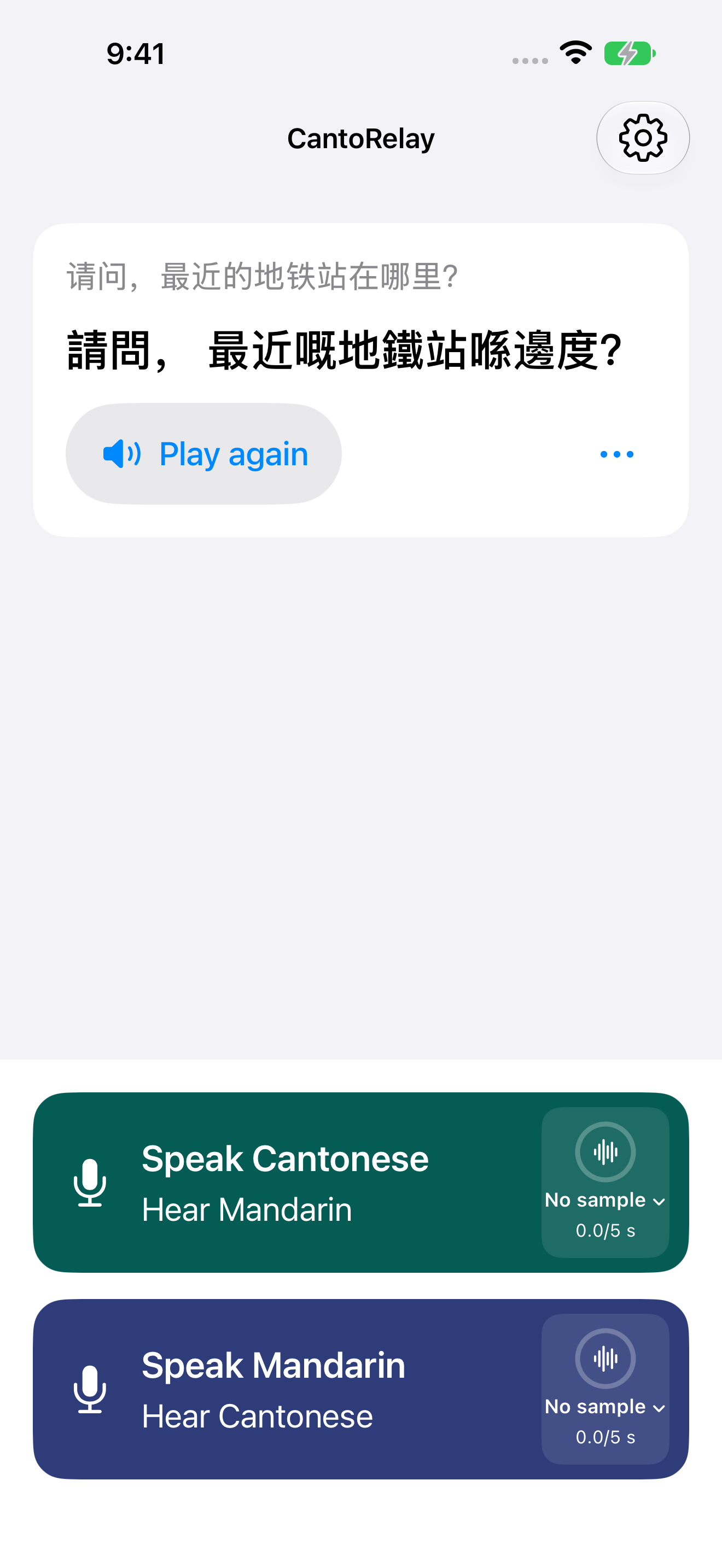
CantoRelay showing a question about the nearest subway station translated from Mandarin into Cantonese

After correcting the transcript, CantoRelay translates it to Cantonese and makes the response ready to play.
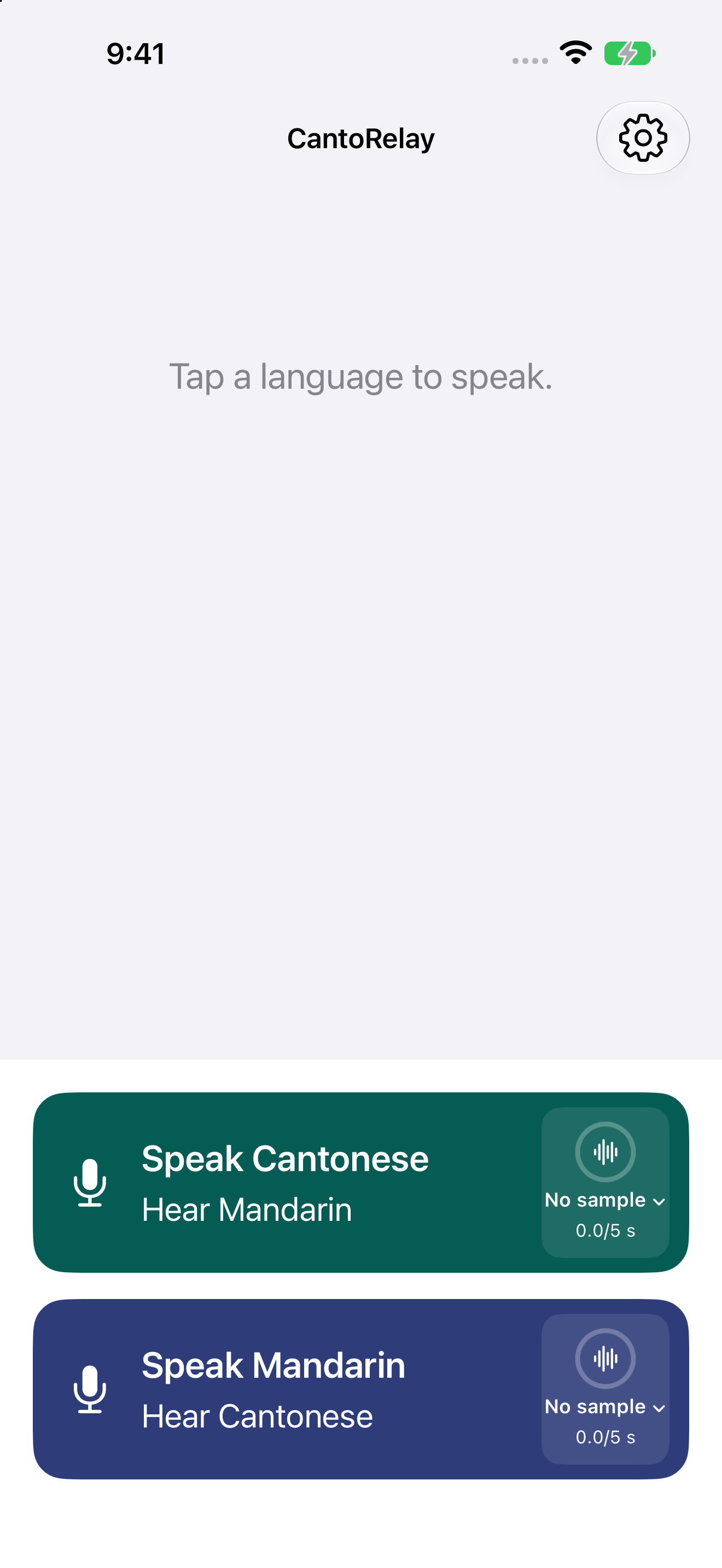
CantoRelay start screen with separate controls for speaking Cantonese and Mandarin

Start a new turn by choosing the language you are speaking and the language you want to hear.

Offline by design

The conversation stays on the iPhone.

Recognition, translation, and speech generation do not use a developer-operated cloud inference service.

Two translation directionsUse Cantonese to Mandarin or Mandarin to Cantonese in the same conversation.
Simplified or TraditionalChoose how Chinese text is displayed without changing the translation direction.
Bundled modelsThe required offline recognition and translation models are included. CantoRelay does not download additional models after installation.
Editable and replayableCorrect recognized text when necessary, translate again, and replay the translated speech.

Choose how the reply sounds

Use a system voice or an agreed speaker voice.

Apple system voices are available without creating a speaker sample. An optional AI speaker voice can be created on the iPhone only after the speaker explicitly agrees.

Explicit agreementOnly use your own voice or one you have explicit permission to use.
Clear identificationCantoRelay identifies cloned speech as AI-generated in the app.
Separate controlsEach language button keeps its own voice choice and speaker sample controls.
Delete or switchClear a voice sample at any time and switch back to an Apple system voice.

Private by default

No account and no cloud inference.

No commercial trackingNo account, subscription, in-app purchase, advertising, or analytics is built into CantoRelay.
Local until deletedConversation text and consented voice samples remain on the device until you delete them.
Apple device backupsLocal app data may be included in Apple device backups according to your Apple settings.
Sharing is your choiceAnything you explicitly share with system features is controlled by your choices and the destination you select.

Available on the App Store

Offline Cantonese–Mandarin conversation for iPhone.

CantoRelay is available for iPhone and requires iOS 26 or later.

Download on the App Store